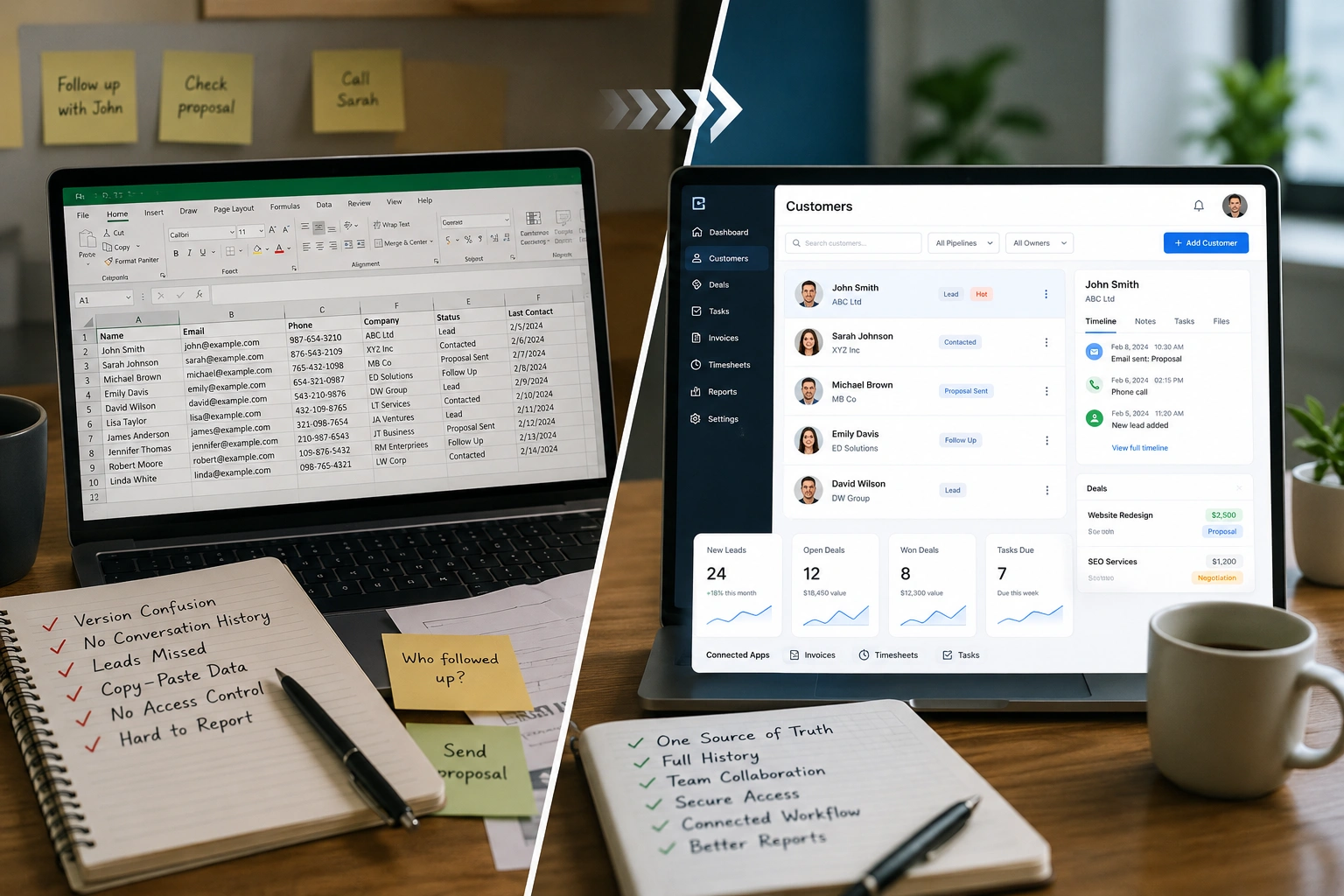
Almost every business starts the same way: a spreadsheet with a few columns for names, emails, and notes. It's free, it's familiar, and for a while it genuinely works. The question isn't whether spreadsheets are bad they're not. It's knowing the moment your spreadsheet stops helping and starts quietly costing you deals, follow-ups, and hours. This guide lays out exactly where that line is, so you can decide whether it's time to move from a spreadsheet to a CRM.
Short answer: a spreadsheet is fine while one person manages a handful of contacts. You should switch to a CRM once more than one person needs the same customer data, once you're losing track of who followed up with whom, or once that customer list needs to connect to the work you deliver and the invoices you send.
What a spreadsheet actually does well
Let's be fair to the humble spreadsheet. It's instant to set up, everyone knows how to use one, and it costs nothing. For a solo owner tracking twenty contacts, a spreadsheet is often the right call reaching for heavy software too early is its own kind of mistake. If your customer list is small, static, and only you ever touch it, you probably don't need anything more yet.
The trouble is that businesses don't stay small, static, and single-user. They grow and that's exactly where a spreadsheet starts working against you.
Where spreadsheets start to break
You rarely notice the tipping point in the moment. It shows up as small, recurring frustrations that add up:
- Version chaos. Two people edit the same file, someone keeps a copy on their desktop, and suddenly nobody knows which version is the real one.
- No memory of conversations. A spreadsheet stores a phone number, but not the three emails, the quote you sent, or what the client said last month. That context lives in someone's inbox or nowhere.
- Things slip through. There's no clear owner for a follow-up and no record of what's been done, so leads go cold simply because everyone assumed someone else had it.
- The same data, typed everywhere. The customer's details get re-entered into your invoicing, your time tracking, and your email the same information copied by hand into three places.
- Everyone sees everything. A shared spreadsheet link is all-or-nothing. There's no real way to give one person access to their accounts without exposing the entire customer list.
- Reporting is a manual chore. Answering "who haven't we contacted this month?" means filtering, sorting, and hoping the data is clean.
If two or three of those sound familiar, your spreadsheet has already stopped saving you time.
What a CRM does differently
A CRM (customer relationship management system) is built for the exact job a spreadsheet struggles with: keeping one reliable, shared record of every customer that a whole team can use at once. Instead of a grid of cells, you get a record per customer that holds the full history who they are, every conversation, and where things stand visible to everyone who should see it and no one who shouldn't.
That single shift solves most of the problems above. There's one source of truth instead of five copies. The context travels with the customer instead of hiding in an inbox. And access can be controlled, so people see what they need to do their job and nothing more.
CRM vs spreadsheet: side by side
| What matters | Spreadsheet | CRM |
|---|---|---|
| Single source of truth | Multiple copies, version confusion | One shared record everyone works from |
| Conversation history | Not really lives in inboxes | Every conversation kept with the customer |
| Team access & permissions | All-or-nothing link sharing | Role-based access per person |
| Security | Weak; easy to copy or leak | Encryption, two-factor authentication, audit trails |
| Connects to billing & work | No you re-enter everything | Feeds invoicing, timesheets, and tasks directly |
| Scales with the team | Breaks as people are added | Built for a growing team |
| Cost & setup | Free, instant | Free plans available; set up in minutes |
7 signs it's time to switch to a CRM
- More than one person needs the same customer data.
- You've lost a lead because nobody followed up or two people followed up.
- You can't quickly see the history of a customer relationship.
- You're copying the same customer details into invoicing, time tracking, or email.
- You're nervous about who can see or download the full list.
- You're spending real time cleaning and reconciling the file.
- The spreadsheet has become so big that opening it feels like a chore.
None of these mean you did anything wrong. They just mean the spreadsheet has done its job and it's time for the next step.
"But switching sounds like a hassle"
This is the real reason most teams stay on a spreadsheet longer than they should the switch feels bigger than it is. In practice, moving is straightforward: you import your existing spreadsheet into the CRM, set who can see what, and carry on. With Hexa Piper, most teams are fully set up in about ten minutes, with no IT team required, so the move happens in an afternoon rather than a project.
The bigger win: a CRM that's connected to everything else
Here's the part a spreadsheet can never do. On its own, a CRM replaces your contact list. But when the CRM shares the same platform as the rest of your operations, switching does far more than tidy your customer data it removes the re-entry between apps entirely.
With Hexa Piper, the CRM keeps every lead, customer, and conversation in one shared record and because it lives on the same platform as invoicing, timesheets, and tasks, that customer record connects directly to the work you deliver and the invoices you send. The details you'd have retyped from a spreadsheet into three other apps are simply already there.
Security comes standard, too: encryption, two-factor authentication, role-based access, and audit trails are included on every plan, including the free one a different world from a spreadsheet anyone can copy. Learn more about our approach to security or explore the full platform.
Move off the spreadsheet start Free for 1 month · No credit card required · Plans from $0/user · View pricing
Frequently asked questions
Is a spreadsheet a CRM?
Not really. A spreadsheet can store a contact list, but a CRM keeps a shared record of every customer and conversation that a whole team can use at once, with access controls and a full history. A spreadsheet is a starting point; a CRM is what you move to when the list needs to be shared, secured, and connected to the rest of your work.
When should a small business switch from a spreadsheet to a CRM?
Switch once more than one person needs the same customer data, once follow-ups are slipping through the cracks, or once you're re-entering customer details into other apps like invoicing or time tracking. If your list is small, static, and single-user, a spreadsheet is still fine.
Is it hard to move from a spreadsheet to a CRM?
No. You import your existing spreadsheet, set permissions, and continue working. With Hexa Piper, most teams are set up in about ten minutes with no IT team required.
Is a CRM worth it for a very small business?
It can be, especially once a second person is involved or your customer data needs to connect to billing and delivery. Free plans mean you can start without cost and only pay as your needs grow.
Is my customer data more secure in a CRM than a spreadsheet?
Generally yes. A shared spreadsheet is easy to copy, forward, or leak. Hexa Piper includes encryption, two-factor authentication, role-based access, and audit trails on every plan, so people only see what they should.
Can I keep using my spreadsheet alongside a CRM?
You can during the transition, but the goal is to make the CRM your single source of truth. Running both long-term recreates the version-confusion problem you switched to solve.